
I have been burned by AI-generated Android code more times than I can count. The code compiles but misses the mark. State scattered across mutableStateOf calls, outdated Material 2 components, navigation routes that break type safety. If you have tried to use an AI tool on a Jetpack Compose app, you have probably hit the same walls. The pattern is clear: AI tools know Kotlin syntax, but they do not understand Compose architecture.
Chris Banes, an Android engineer at Google, open-sourced a skill pack for Claude Code that targets exactly this gap. It is a set of modular SKILL.md files that teach the agent how to make better decisions in Kotlin and Compose projects. Rather than re-explaining your architectural rules in every prompt, you drop the skills in once and Claude Code applies them automatically. The repo is at github.com/chrisbanes/skills.
This post covers what is in the skill pack, how to install it, and whether it is worth your time.
The problem this skill pack solves
Why developers struggle with Compose workflows
The issue is not developer expertise. It is that AI tools cannot make sound architectural decisions in Compose. Even with solid Kotlin chops, the generated code skips unidirectional data flow, picks the wrong state primitive, or ignores modifier order.
Common failure modes:
- Business logic leaking into
@Composablefunctions instead of being isolated in ViewModels. - State scattered across multiple
mutableStateOfinstances rather than centralized in aStateFlow. - One-shot events modeled as booleans, which re-trigger on configuration changes.
Performance is the other half. Without an understanding of Compose's three-phase model, AI-generated code reads state in the wrong phase, skips stability annotations, or triggers unnecessary recompositions. Restartable-but-unskippable composables are a frequent culprit; they negate the compiler's optimization passes and show up as frame drops on real devices.
Where existing tools fall short
Most AI tools train on stale patterns. They suggest Material 2 components instead of Material 3, string-based navigation routes instead of type-safe alternatives, or Accompanist libraries that have since been folded into core Compose. In Compose Multiplatform projects, the same tools will happily reach for Android-specific APIs like android.content.Context inside shared modules, which breaks the iOS and desktop builds.
The documentation gap is the deeper issue. Official Android docs are written for humans. LLMs need terse, directive instructions with paired right-and-wrong examples. A linked URL inside a CLAUDE.md file is not a substitute. A well-crafted SKILL.md is.
What you need before getting started
Required tools and environment setup
Before you install anything, confirm you have Android Studio Giraffe or later, Kotlin 2.0.20+ (required for Compose Compiler 1.5.4+), and Gradle. Your project should use the 2024.x or 2025.x Jetpack Compose BOM. Older BOMs miss APIs the skills reference. You also need Git, and Node.js if you plan to install via npx skills add.
Installing and configuring Claude Code
Install Claude Code from Anthropic's official CLI distribution. Once installed, Claude Code auto-detects skills in two places:
~/.claude/skills/for personal skills used across all projects..claude/skills/at the root of a repo for project-specific skills.
If a skill uses dynamic context injection (e.g. running git diff HEAD inline), make sure disableSkillShellExecution is not set to true. For project-level skills, Claude Code will trigger a workspace trust dialog the first time you open the project. Accept it so the skill can use Bash, Read, and Grep. Any change to the skills directories requires restarting Claude Code.
Installing the skill pack
The fastest path is the official CLI:
npx skills add chrisbanes/skills
Or install as a Claude Code plugin:
/plugin marketplace add chrisbanes/skills
/plugin install chrisbanes-skills
If you prefer the manual route (recommended for easy git pull updates), clone the repo to a stable location and symlink the individual skill folders:
git clone https://github.com/chrisbanes/skills ~/.claude/skills-sources/chrisbanes-skills
ln -s ~/.claude/skills-sources/chrisbanes-skills/compose-state-hoisting ~/.claude/skills/compose-state-hoisting
Verify the install with /skills in the Claude Code CLI. The skill should appear as active. One catch: the SKILL.md file must sit at the root of each linked folder. If it is nested deeper, Claude Code will not register it.
How the skill pack is organized
Directory layout and key components
The repo bundles multiple focused skills rather than one monolithic file. Each skill targets one decision area, which keeps Claude's context lean. The headline skills:
- compose-state-authoring: how to author local mutable state and read-only composable accessors.
- compose-state-hoisting: when state belongs in
remember, hoisted parameters, a state holder, or the screen-level state holder. - compose-recomposition-performance: stability, skipping, and recomposition rules.
- kotlin-flow-state-event-modeling: modeling state vs. one-shot events with
StateFlowandSharedFlow. - kotlin-coroutines-structured-concurrency: scope, cancellation, and lifecycle.
Inside each skill folder you will find the same shape:
| Component | Path | Purpose |
|---|---|---|
| Manifest | SKILL.md | YAML frontmatter (name, description, triggers) and the main instructions |
| Knowledge base | references/ | On-demand docs loaded only when needed |
| Boilerplate | assets/templates/ | Pre-configured Gradle and project setup files |
| Automation | scripts/ | Validation and feature-generation scripts |
Keep SKILL.md under 500 lines if you fork or customize. Anything longer eats into Claude's working context.
How Claude Code reads and uses skills
Claude Code scans the skills directories and parses the YAML frontmatter of each SKILL.md. Initially it only loads the description field. The rest of the file stays out of context until a prompt or a manual command triggers it.
The description and when_to_use fields drive auto-triggering. Claude evaluates incoming prompts against them. Vague descriptions equal skills that never fire.
Once triggered, the full SKILL.md gets injected as a single message and stays active for subsequent turns. If the session needs token compaction, Claude retains the most recent skill invocation within a 25,000-token cap, with up to 5,000 tokens per skill.
The !<command> syntax injects live shell output into the prompt before Claude sees it. Handy for embedding compiler reports or the current git diff so the agent has a real-time view of the codebase.
Configuring the skill pack for your project
Adjusting skill behavior
To tailor a skill, edit the SKILL.md frontmatter. Update description and when_to_use to match your project's vocabulary. If you use a custom design system or libraries like haze, list those terms so Claude recognizes them as triggers.
The paths field scopes a skill to specific modules using glob patterns. Useful in monorepos where Compose guidance does not belong in :data or :network. Patterns like feature/** or ui-components/** keep the skill focused.
Inline your version catalog to give Claude exact dependency info:
## Versions
!`cat gradle/libs.versions.toml`
This pulls the current compose-bom version into the prompt automatically. Edits to SKILL.md apply immediately in an active session. If you want a skill to run only when explicitly invoked, set disable-model-invocation: true.
Platform-specific configurations
macOS and Linux use bash by default and need no extra setup. Windows users have to set shell: powershell in the SKILL.md frontmatter and export CLAUDE_CODE_USE_POWERSHELL_TOOL=1 in the session.
| Configuration | macOS / Linux | Windows |
|---|---|---|
| Default shell | bash | bash or powershell |
| Required env var | N/A | CLAUDE_CODE_USE_POWERSHELL_TOOL=1 |
| Skill path | ~/.claude/skills/ | %USERPROFILE%\.claude\skills\ |
| Frontmatter setting | shell: bash | shell: powershell |
When referencing bundled scripts in scripts/ or references/, use the ${CLAUDE_SKILL_DIR} substitution variable instead of hardcoding paths. Keeps things cross-platform.
One more: the allowed-tools field is case-sensitive. Bash, Read, and Grep work. Lowercase bash or grep will not.
Core workflows the skill pack enables
Building UI layouts and managing state
The skill pack enforces a three-tier UI pattern. Route composables handle ViewModel wiring and lifecycle. Screen composables render based on state and callbacks. Leaf composables handle localized UI effects like focus or animations. Claude Code applies the pattern whenever it detects relevant @Composable functions.
For state, the guidance centralizes everything in a ViewModel backed by StateFlow, which makes the surface testable. For one-off events like snackbars or navigation, use Channel<Effect> so configuration changes do not re-trigger the same event. Pick the right primitive for the job: derivedStateOf for computed values, rememberSaveable for state that has to survive process death.
Testing and debugging Compose projects
The reference files target one task each. One walks through using Turbine to test StateFlow, SharedFlow, and Channel. Another covers Ktor's MockEngine for network tests. A third covers PagingSource unit tests with asSnapshot and TestPager. Claude only loads the relevant file, keeping the context tight.
The recommended MVI test pattern is short: fire an event into the ViewModel, observe the resulting StateFlow or Channel effect, assert. For performance debugging, run Compose Compiler Metrics to find restartable-but-non-skippable functions. Run them against release builds. Debug builds use live literals and produce misleading numbers.
Optimizing performance
The performance reference covers recomposition rules and a catalog of common anti-patterns, each paired with a replacement snippet. Key moves:
- Defer state reads to the layout or draw phase (use
graphicsLayerfor animations) to skip unnecessary recompositions. - Enable strong skipping mode via the compiler flag so composables with unstable parameters can be skipped when those parameters do not change.
- For lazy lists, set stable keys and content types to cut redundant re-renders.
A subtle anti-pattern the skill flags: passing Flow objects directly as composable parameters. Collect the flow in the ViewModel or at a higher UI boundary, then pass stable state down the tree.
Extending and customizing the skill pack
Editing skill definitions
Each skill is one SKILL.md file with YAML frontmatter and a Markdown body. The two fields to tune first are description and when_to_use. Rewrite them in your project's vocabulary. If you maintain a Material 3 component library internally, name those components so Claude links them to the skill.
The body is where project-specific architecture lives. Replace generic guidance with your ViewModel naming conventions, your preferred state management, and any design-system constraints. If the body exceeds 500 lines, move detailed API specs or long code examples to a references/ subfolder. Claude only loads references/ when needed, so this trims the always-on context.
Use the paths field to scope a skill to file patterns like **/*.compose.kt. For skills you want fired only on demand, set disable-model-invocation: true.
Adding real Compose examples
The most effective SKILL.md files include paired right-and-wrong examples. For animation perf, that means showing Modifier.offset { IntOffset(...) } as the correct form and Modifier.offset() as the incorrect one. The agent uses these as concrete rules instead of inferring from prose.
For real source samples, lean on Chris's own repos: Tivi and Haze. To keep examples current, inject live source into the skill context with shell commands like:
!`grep -r "LazyColumn" /path/to/tivi`
End each skill with a short verification checklist. It gives the agent a final pass to compare generated code against your stated rules.
Keeping the skill pack up to date
Symlinks are the easiest update path for community skills. Clone the repo to a stable path, symlink the skill folders into ~/.claude/skills/, and pull updates with git pull in the source directory.
For your own customizations, keep them in the project-level .claude/skills/ directory instead of editing the community files. Claude Code loads skills in a hierarchy: Enterprise, Personal (~/.claude/skills/), then Project (.claude/skills/). Project-level overrides win, which keeps your changes isolated from upstream updates.
If your project pins a specific Compose BOM version, declare it in the SKILL.md frontmatter so Claude does not suggest APIs from a newer release.
| Update method | Best for | Maintenance action |
|---|---|---|
| Symlinking | Community repos like chrisbanes/skills | git pull in source directory |
| Git submodule | Project-specific integration with version locking | git submodule update --remote |
| Manual copy | Heavily modified forks | Manual diffing and replacement |
How to create good agent skills
Common problems and how to fix them
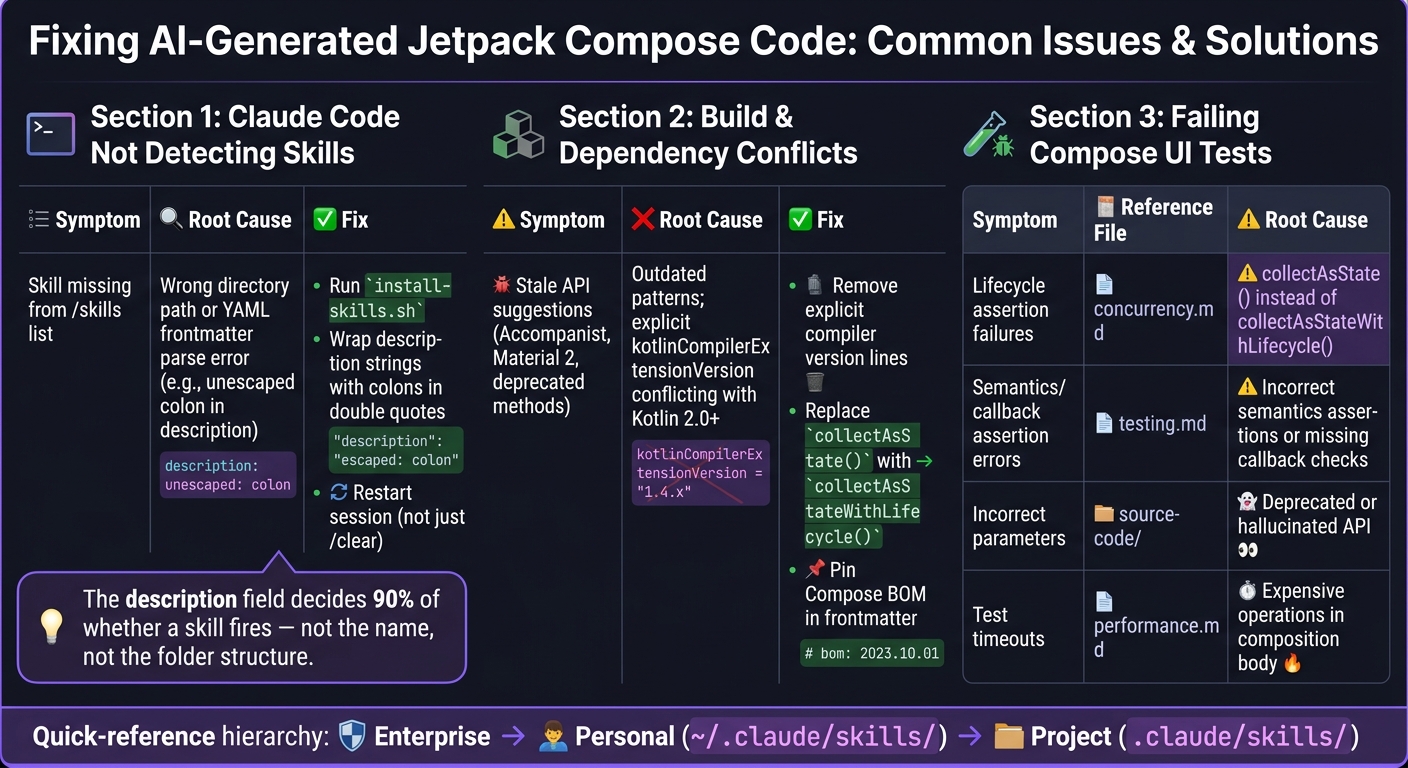
Fixing AI-generated Compose code: common issues and skill pack solutions.
Claude Code not detecting skills
First check the directory. Project-local goes in .claude/skills/ at the repo root; global goes in ~/.claude/skills/. The bundled install-skills.sh can symlink nested folders into the flat structure Claude expects.
Once paths look right, run /skills list to confirm the skill is loaded. If it is still missing, suspect the frontmatter. YAML parsing errors (usually an unescaped colon in a description string) silently prevent loading. Wrap strings containing colons in double quotes. Adding or modifying a skill mid-session requires a full restart. /clear alone will not pick up the change.
If a skill appears in /skills list but the matching slash command does nothing, the frontmatter is missing user-invocable: true. Without it, Claude can use the skill internally but you cannot trigger it manually. For deeper diagnostics, run /skills debug <skill-name> or check the session log at ~/.claude/logs/session-$(date +%Y%m%d).log.
Build and dependency conflicts
On Kotlin 2.0+, the Compose compiler ships with the Kotlin plugin. Drop any explicit kotlinCompilerExtensionVersion line and let the plugin manage it. Pin your Compose BOM version in the skill frontmatter so the agent does not suggest APIs from a newer release.
Another recurring miss: Claude generating code with deprecated Accompanist libraries or Material 2 components. Replace any collectAsState() call on Android UI flows with collectAsStateWithLifecycle() to stop recompositions firing while the UI is in the background.
Fixing failing Compose UI tests
AI-generated UI tests usually fail for three reasons: lifecycle, assertions, or stale APIs.
Lifecycle failures almost always trace to collectAsState() instead of collectAsStateWithLifecycle(). See the skill's concurrency.md reference. Assertion failures usually mean incorrect semantics assertions or missing callback checks; see testing.md.
Stale APIs mean Claude generated a deprecated signature. Cross-check against the source-code/ folder in the skill pack. runtime-source.md and material3-source.md hold the accurate implementations.
Test timeouts usually point at expensive I/O or O(N) work inside the composition body. Move it to a LaunchedEffect or a ViewModel. performance.md covers the patterns.
| Symptom | Reference file | Root cause |
|---|---|---|
| Lifecycle assertion failures | concurrency.md | collectAsState() instead of collectAsStateWithLifecycle() |
| Semantics / callback assertion errors | testing.md | Incorrect semantics assertions or missing callback checks |
| Incorrect parameters | source-code/ | Deprecated or hallucinated API |
| Test timeouts | performance.md | Expensive operations in the composition body |
FAQs
Will this skill pack actually improve Compose architecture, not just syntax?
Yes, indirectly. The skills focus on correctness and idiomatic Compose, but the rules they enforce (state hoisting, recomposition control, lifecycle-aware collection) produce architecturally cleaner code as a side effect. You will not get a full architecture rewrite, but you will stop seeing the worst classes of mistakes.
How do I install the skill pack so Claude Code reliably detects it?
Two reliable paths. The skills CLI: npx skills add chrisbanes/skills. Or the Claude Code plugin marketplace: /plugin marketplace add chrisbanes/skills followed by /plugin install chrisbanes-skills. For manual installs, follow the repo's INSTALL.md.
How can I customize triggers and limit the skill to only my UI modules?
Edit the SKILL.md frontmatter. Tighten description and when_to_use so Claude only triggers on prompts that involve UI work. Use the paths field with glob patterns like feature/** or ui-components/** to scope the skill to UI modules. Skills outside those paths will not fire.
Does this replace other Compose skill packs?
Not necessarily. Chris Banes's skills focus on Kotlin and Compose fundamentals. Packs like skydoves/compose-performance-skills and aldefy/compose-skill cover overlapping territory with different emphasis. Skills are additive, so you can run multiple at once if their description fields are scoped well enough to avoid double-firing.
Comments